
Kobo | eBooks & Audiobooks
Kobo BooksBooks & Reference
4.521.14K Reviews
- Version
- Varies With Device
- Installs
- 10.00M
- Age Rating
- Teen
Screenshots


Our Review of Kobo | eBooks & Audiobooks
 Analysis by Appyee
I judge a reading app by what happens in the small gaps of a day: can I get back into a chapter quickly, does listening fit an errand, and can I make the screen comfortable when the light changes? Kobo is built around those everyday shifts between reading and listening. It is a free Books & Reference app from Kobo Books, with optional in-app purchases, so browsing the app does not mean every book or audiobook is included at no cost. That distinction matters if you want a large personal library without surprise spending.
Quick access matters more than raw speed
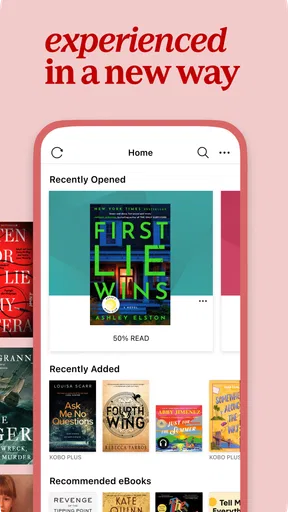
For an app like this, I care less about a flashy launch and more about how little effort it takes to resume a book. Kobo’s appeal is that it brings ebooks and audiobooks together in one place, letting a reader move between formats according to the moment. A short wait or an extra tap is easy to forgive; losing my place or having to remember where I stopped is not. The app’s reading and listening tools are aimed at reducing that sort of friction.
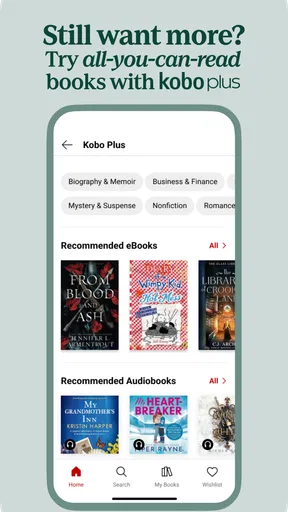
Browsing can also affect how quickly I get to something worth reading. Genre, author and user-rating filters help narrow a search instead of forcing me to scroll through a broad catalogue. A preview is useful when I’m unsure whether a book’s opening, voice or style will hold my attention. My practical tip is to treat previews as a way to check fit, not merely as a teaser: read enough to judge the prose and pacing before paying for a title.
Discovering a World of Stories
First things first, if you’re a fan of books, you’re in for a treat. The Kobo app is like having a massive bookstore right in your pocket. With millions of titles available, you can find everything from bestsellers to hidden gems. Whether you’re into thrilling mysteries, heartwarming romances, or thought-provoking non-fiction, Kobo has got you covered.
What’s really neat is how easy it is to navigate around the app. Even if you’re a tech newbie, you’ll find your way around in no time. The search function is robust, allowing you to filter results by genre, author, or even user ratings. Plus, they’ve got this awesome feature where you can preview books before making a purchase. It’s like test-driving a car, but for books!
Seamless Audiobook Experience
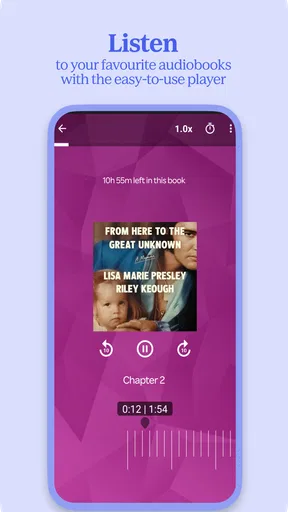
If you’re more of a listener than a reader, the audiobook section of Kobo is pure gold. The app offers a wide range of audiobooks, narrated by some seriously talented voices. Whether you’re on a long commute, working out, or just chilling at home, you can dive into a story hands-free.
The audio player is super user-friendly. You can easily adjust playback speed, set sleep timers, and even bookmark where you left off. It’s the perfect companion for those who love multitasking while getting lost in a good story.
Listening on purpose, not just in the background
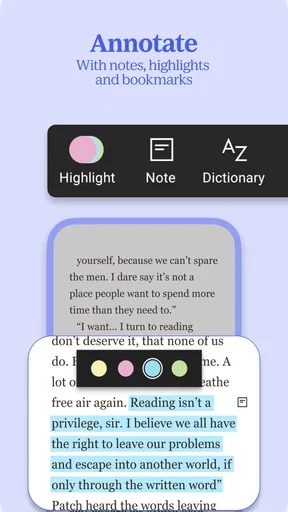
Audio controls are most useful when they match a routine. On a walk, I might raise the playback speed slightly to keep a familiar narrator moving; before bed, a sleep timer can stop playback from running on after I drift off. A bookmark is particularly handy when I pause for a conversation or an unexpected stop, because it gives me a deliberate point to return to instead of relying on memory.
There is a trade-off: listening is not always a substitute for reading. I prefer audio for a commute or chores, but a complicated passage, a list of names, or a section I want to quote is easier to revisit visually. Switching formats can make a book more flexible, but it does not remove the need to choose the right format for the task. If you mostly want a dedicated audiobook player and have no interest in ebooks, a specialized listening service may suit your habits better.
Personalized Reading Experience
One of the coolest things about Kobo is how it tailors your reading experience. It tracks your reading habits and suggests books that match your interests. It’s like having your very own personal librarian, always ready with a recommendation that’s right up your alley.
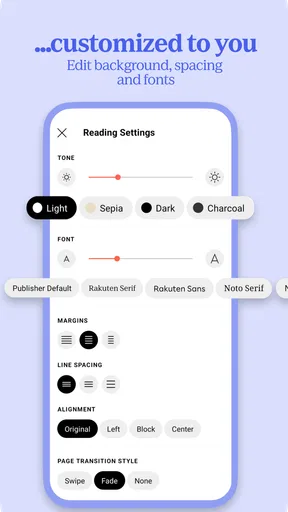
Plus, you can customize your reading settings. Want a dark theme for night reading? Done. Prefer a specific font size or style? You got it. Kobo makes sure your reading experience is just how you like it.
Making recommendations work for you
Personalized suggestions are convenient, but I would not use them as my only discovery method. Reading habits can be narrow: if I keep choosing one genre, recommendations may steer me toward more of the same. I use filters to explore deliberately when I want a change, then treat suggestions as a shortcut for filling a reading list rather than as a verdict on what I will enjoy.
Screen settings are more than decoration. A larger font can make a quick reading session less tiring, while a darker theme can be more comfortable in a dim room. The useful approach is to adjust settings for the place you are reading, not to assume one setup is ideal everywhere. On a bright commute, the setting that feels pleasant in bed may be harder to read; a small change before settling in can save repeated fiddling later.
Sync Across Devices
Another feature worth mentioning is the seamless syncing across devices. Whether you’re reading on your phone, tablet, or even an eReader, Kobo keeps track of your progress. You can start a book on one device and pick up right where you left off on another. It’s all about making life easier for us busy bees.
A realistic day with one library
Imagine starting a chapter on your phone while waiting for an appointment, switching to an audiobook during the walk home, then reading a few more pages on a larger screen at night. That is where a combined ebook-and-audio library can feel more useful than keeping unrelated apps for each format. Syncing is valuable in this routine because the change of device is not the point; getting back to the story is.
For the smoothest handoff, I would pause deliberately and give the app a moment to keep the current position before switching devices. That is a sensible habit with any synced reading service, especially when connectivity is uneven. Sync is a convenience, not a reason to assume every transition will be instantaneous. If a position looks stale, checking the device where you last read or listened is a better first step than tapping forward repeatedly and risking confusion about the correct place.
Reliability when a session gets interrupted
Reading apps earn trust through ordinary recovery: a phone call arrives, a train stop comes up, or a listening session ends sooner than planned. Kobo’s bookmarks, sleep timer and progress syncing all support a more controlled return to a book. I like that these tools address different interruptions rather than asking me to solve everything with one feature. Still, an app cannot make a weak connection or a low battery disappear, so I would avoid beginning a long journey with an untested setup.
Before relying on any digital library for a trip, I make sure the title I want is accessible on the device I plan to use and that I know how to resume it. That simple check is more practical than assuming an app will behave exactly the same in every location. If you depend on reading during commutes, keep your phone charged and have a second way to pass the time; Kobo is a convenient library, not a replacement for basic travel preparation.
How it compares with familiar alternatives
Compared with a single-format ebook reader, Kobo’s strongest distinction is the inclusion of audiobooks alongside digital reading. That makes it a natural choice for someone who alternates between looking at a page and listening hands-free. A dedicated e-reader may still be better for a person who wants a separate reading device and a focused, book-only experience. Likewise, readers already committed to another ebook ecosystem may prefer to keep purchases and reading history together there rather than split a library.
Compared with browsing books through a general online shop, Kobo puts the reading experience and the catalogue in the same app. The advantage is convenience; the drawback is that discovery and buying can become part of the same routine, which makes it worth checking a preview and the purchase details before committing. Kobo is best for readers who value a broad digital selection and format flexibility, not for someone looking exclusively for free books or a physical-book collection.
Device limits and everyday comfort
A phone is excellent for carrying a book everywhere, but it is not automatically the best screen for every session. A small display can make long stretches of reading feel cramped, and listening for hours can be awkward if battery life is already a concern. A tablet or eReader can be more comfortable for extended reading, while a phone is often the most practical option for brief pauses and travel. Kobo’s ability to span devices helps, but it cannot change the physical limits of the device in your hand.
Resource use is hard to judge in the abstract because it depends on the phone, the length of a session and whether I am reading or playing audio. I would not assume that an app combining two formats is automatically lightweight on every device. If an older phone feels sluggish, close other demanding apps and test a short session before making Kobo your main travel companion. That is a more useful test than expecting identical performance across different hardware.
The Community and Extras
Kobo isn’t just about reading; it’s also about community. You can join Kobo’s online community to discuss books, share reviews, and connect with other book enthusiasts. It’s like having a book club that’s always open for discussion.
And let’s not forget the extras! Kobo often offers deals and discounts, so you can snag your next read without breaking the bank. Plus, with the Kobo VIP Membership, you get additional perks like extra savings and double the rewards points. Who doesn’t love a good deal?
Cost, age suitability and who should choose it
The app is free to install, but in-app purchases range from a few cents to very large per-item amounts, so I would think of it as a storefront and library app rather than a promise of free reading. Check the individual title and any membership terms before buying; a discount can be worthwhile only if it applies to books you genuinely want. With a 4.5 average from around 298,000 ratings, it has broad appeal, though a rating cannot tell you whether its catalogue matches your taste or how it will feel on your particular device.
Kobo is rated Teen and has been available since 2010. I would recommend it to readers who want one place for ebooks and audiobooks, like adjusting text settings, or regularly switch between a phone and another reading device. I would skip it if I want only physical books, expect every title to be included for free, or am already satisfied with a competing library and do not want to manage purchases across services. It has over 10 million installs, but popularity matters less than whether its reading and listening mix fits your routine.
Final performance verdict
My overall view is that Kobo is strongest when I use it as a flexible home for a book, rather than expecting it to solve every reading problem. Its filters and previews help me choose; customizable settings make reading more personal; audio controls suit walks and bedtime; and syncing supports moving between devices. Those are practical strengths, not just a long list of features, because each one can remove a small obstacle that might otherwise interrupt a reading habit.
The trade-offs are equally real: purchases require attention, recommendations should not dictate what I read, and the best experience depends partly on the screen, battery and connection available. For a person who reads in short pockets of time and likes both text and narration, I think Kobo is an easy app to try. For someone who wants a strictly free catalogue, a dedicated single-purpose reader, or no digital purchases at all, another approach will be a better match.
Wrapping it up, Kobo | eBooks & Audiobooks is a must-have for anyone who loves to read or listen to books. It’s user-friendly, packed with features, and offers a vast library of titles. Whether you’re a lifelong bookworm or just starting your reading journey, this app has something for everyone. So why not give it a try? You might just find your next favorite book waiting for you.
Verdict
Strengths of Kobo | eBooks & Audiobooks
- Wide selection of eBooks and audiobooks.
- User-friendly interface with easy navigation.
- Syncs seamlessly across multiple devices.
- Offers customizable reading settings.
- Offline reading available for convenience.
Limitations of Kobo | eBooks & Audiobooks
- Limited social features for sharing books.
- Some titles may be region-restricted.
- Occasional slow downloads for audiobooks.
- Subscription model can be costly.
- Ads may appear in the free version.
Similar Picks in This Category
View All
Google Play Books & Audiobooks
Google LLC4.7

네이버 - NAVER
NAVER Corp.3.5

Wattpad - Read & Write Stories
Wattpad.com3.7

King James Bible - Verse+Audio
Ozion4.8

Bible Offline-KJV Holy Bible
Bíblia Offline4.9

Amazon Kindle: Reading App
Amazon Mobile LLC4.8
Frequently Asked Questions
What is Kobo and how does it work?
Kobo is a comprehensive platform for accessing and reading eBooks and audiobooks on your smartphone or tablet. It offers a vast library of titles across various genres. Once you download the app, you can purchase or download free books, customize your reading experience, and sync your library across devices.
Can I use Kobo offline?
Yes, Kobo allows you to download eBooks and audiobooks for offline access. Once downloaded, you can read or listen to your content without an internet connection. This feature is particularly useful for users who travel frequently or have limited internet access.
Is there a subscription fee for using Kobo?
Kobo itself is a free app, but you'll need to purchase most eBooks and audiobooks. It also offers a Kobo Plus subscription, which provides unlimited access to a selection of titles for a monthly fee. This option is ideal for avid readers looking to explore more without buying each book.
How does Kobo compare to other eReader apps?
Kobo stands out with its extensive library, customizable reading settings, and seamless integration with Kobo eReaders. It supports a variety of formats and offers features like night mode, adjustable font sizes, and margin settings, making it a strong competitor against other eReader apps like Kindle.
Can I read books purchased from other platforms on Kobo?
Kobo supports several formats, including EPUB and PDF. If your eBooks are in these formats, you can usually transfer them to the Kobo app. Keep in mind, however, that books with DRM protection from other platforms may not be compatible without conversion.
